
Debounce with Immediate Flag (Leading Edge Execution)
In high-performance web applications, handling user input efficiently is critical. Debouncing is a standard optimization technique used to limit the execution rate of a function. However, the standard "trailing edge" debounce introduces a perceived lag, which is undesirable for actions requiring instant feedback (e.g., submitting a form, liking a post).
Adding an immediate (leading-edge) flag solves this problem by executing the callback instantly on the first trigger, then ignoring subsequent high-frequency calls for a specified lockout duration.
1. Quick Comparison: Trailing vs. Leading Edge
| Feature | Standard Debounce (Trailing Edge) | Immediate Debounce (Leading Edge) |
|---|---|---|
| First Trigger | Delays execution; waits for inactivity window. | Executes immediately without delay. |
| Subsequent Triggers | Resets the timer; delays execution further. | Ignored if they occur during the active lockout period. |
| Ideal Use Cases | Search autocomplete, window resizing, autosave. | Form submission buttons, payment buttons, upvote/like triggers. |
| User Experience | Non-blocking but has a perceived delay. | Feels instantaneous, while providing rate-limiting protection. |
2. Visualizing the Timelines
Understanding the difference visually helps in understanding the underlying state machine.
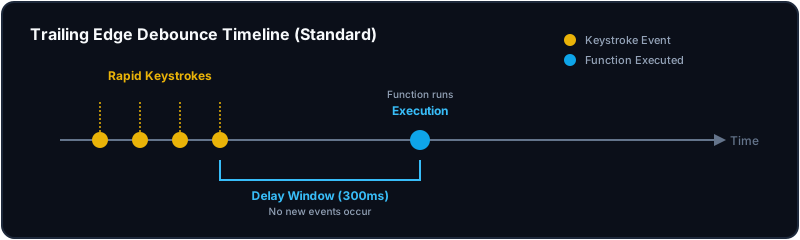
Trailing Edge Debounce (Standard)
In standard trailing-edge debouncing, the execution happens only after the user stops firing events for the duration of the delay.
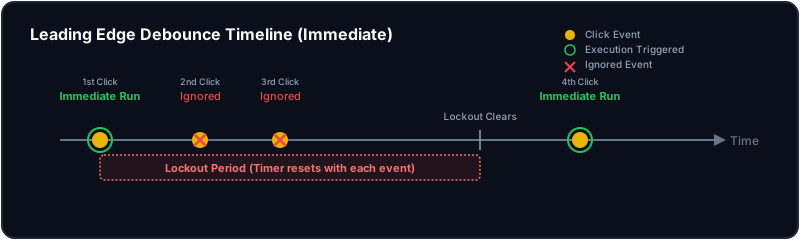
Leading Edge Debounce (Immediate)
In leading-edge debouncing, the first trigger is executed instantly, starting a lockout period. Any events fired within that lockout window are discarded, but they still extend the lockout duration to ensure the rate limit is enforced.
3. Step-by-Step Implementation
Step 3.1: Standard Trailing-Edge Debounce
Here is the standard implementation using closures and setTimeout:
function debounce(fn, delay) {
  let timerId = null;

  return function (...args) {
    const context = this;

    // Reset the timer on every call
    if (timerId) {
      clearTimeout(timerId);
    }

    // Schedule execution
    timerId = setTimeout(() => {
      fn.apply(context, args);
    }, delay);
  };
}
Step 3.2: Complete Debounce with immediate Flag
To support both leading and trailing edge execution, we add a third parameter immediate = false. The goal is to determine if the function is being triggered on a "fresh" start (i.e., when no active timer is running).
function debounce(fn, delay, immediate = false) {
  let timerId = null;

  return function (...args) {
    const context = this;

    // 1. Determine if we should execute immediately
    // We only execute immediately if the user requested it AND there is no active timer.
    const callNow = immediate && !timerId;

    // 2. Clear any existing timer to reset the delay window
    if (timerId) {
      clearTimeout(timerId);
    }

    // 3. Set up the new timer
    timerId = setTimeout(() => {
      // Once the delay passes, we clear the timer reference.
      // This resets the "fresh" status, allowing the next immediate call.
      timerId = null;

      // If we are NOT in immediate mode, execute the trailing-edge call.
      if (!immediate) {
        fn.apply(context, args);
      }
    }, delay);

    // 4. If leading edge conditions are met, execute immediately
    if (callNow) {
      fn.apply(context, args);
    }
  };
}
4. Code Walkthrough & Deep Dive
Let's dissect the implementation details that senior interviewers look for:
4.1 Closure Scope & State Persistence
The outer function debounce is called once, returning the wrapper function. It initializes let timerId = null; in its lexical scope. Due to closures, the returned wrapper retains reference to this timerId, allowing it to persist state across consecutive invocations.
4.2 Context (this) and Arguments Binding
Inside the wrapper, this refers to the execution context of the wrapper at runtime (e.g., a DOM element handling an event).
- We use
fn.apply(context, args)to ensure that:- The target function
fnruns with the correctthiscontext. - All arguments passed to the debounced wrapper (like the event object
e) are forwarded unchanged to the target functionfn.
- The target function
4.3 Understanding the Immediate Logic
const callNow = immediate && !timerId;When the wrapper is called, ifimmediateistrueandtimerIdis null, it means no timer is currently active (a "cold" start). Thus,callNowevaluates totrue.timerId = nullinsidesetTimeoutWhen the timeout completes, settingtimerId = nullis crucial. It serves as the indicator that the lockout window has ended, permitting the next keypress or click to trigger immediate execution again.clearTimeout(timerId)Even inimmediate = truemode, clearing the timeout is important. It ensures that if the user continues to spam clicks, the lockout window is continuously extended, preventing any actions until the user stops clicking for the specifieddelay.
5. Real-World Examples
5.1 Vanilla JS: Double-Click Prevention on Forms
Preventing double-submissions of transactional actions like checkouts or orders:
<button id="checkout-btn">Submit Order</button>

<script>
  const checkoutBtn = document.getElementById("checkout-btn");

  const processOrder = debounce(() => {
    console.log("Processing order API request...");
    // Perform API call here
  }, 2000, true); // 2-second lockout window, immediate execution

  checkoutBtn.addEventListener("click", processOrder);
</script>Behavior: Clicking the button fires the API call immediately. Spammed clicks within 2 seconds are completely ignored, protecting the backend from double-debits.
5.2 React Hook: Custom Reusable useDebounce Hook
In React, state changes cause component re-renders. A standard debounce implementation defined inside a component would get recreated on every render, resetting the timer.
Here is a robust, custom hook that handles component lifecycles, returns a memoized function, and cleans up timers on unmount:
import { useEffect, useRef, useCallback } from "react";

type DebouncedFn<T extends (...args: any[]) => any> = (...args: Parameters<T>) => void;

export function useDebounce<T extends (...args: any[]) => any>(
  fn: T,
  delay: number,
  immediate = false
): DebouncedFn<T> {
  const timerRef = useRef<ReturnType<typeof setTimeout> | null>(null);

  // Store the latest callback reference to avoid re-triggering the effect
  const callbackRef = useRef<T>(fn);
  useEffect(() => {
    callbackRef.current = fn;
  }, [fn]);

  // Clean up timer on component unmount
  useEffect(() => {
    return () => {
      if (timerRef.current) {
        clearTimeout(timerRef.current);
      }
    };
  }, []);

  // Return memoized debounced function
  return useCallback(
    (...args: Parameters<T>) => {
      const callNow = immediate && !timerRef.current;

      if (timerRef.current) {
        clearTimeout(timerRef.current);
      }

      timerRef.current = setTimeout(() => {
        timerRef.current = null;
        if (!immediate) {
          callbackRef.current(...args);
        }
      }, delay);

      if (callNow) {
        callbackRef.current(...args);
      }
    },
    [delay, immediate]
  );
}
Utilizing the Hook in a Component:
import { useDebounce } from "./hooks/useDebounce";

function SignupForm() {
  const handleRegister = useDebounce(
    (userId: string) => {
      console.log(`Sending API request to register user: ${userId}`);
    },
    3000,
    true // immediate execution
  );

  return (
    <button onClick={() => handleRegister("user_123")}>
      Register Account
    </button>
  );
}
6. Common Interview Q&A
Q1. What is the difference between Debounce and Throttle?
- Debounce groups multiple sequential calls into a single call. It waits for a period of silence (inactivity) before executing.
- Throttle guarantees execution at a regular, fixed interval (e.g., executing a scroll handler at most once every 100ms), regardless of how frequently events are fired.
Q2. What happens to the timer context when immediate is true and events keep firing?
If the immediate flag is set to true, the first click triggers the callback immediately. If clicks continue to fire repeatedly (faster than the delay), the timerId is cleared and recreated. The callback will not execute again until the clicks stop completely for the duration of the delay, and a subsequent event fires.
Q3. Why use fn.apply(context, args) instead of arrow functions?
If we used an arrow function for the wrapper, it would inherit this from its parent lexical context (which is often window or undefined). Traditional function declarations bind this to the object calling the method (like the button element). Using .apply() ensures the context is accurately preserved.
7. Complexity Analysis
- Time Complexity: $\mathcal(1)$ for scheduling and clearing timers. The setup operations (creating objects, assigning variables) take constant time.
- Space Complexity: $\mathcal(1)$ auxiliary space. The wrapper closure only retains a single reference to
timerIdand the callback parameters.